


This is a question I get all the time from clients here in North Scottsdale, Arizona. That’s because most small business owners know that their Google business page is an important way to get found in the search results, even if they already have a website.
For most people looking for a local service or retailer, a business that shows up in the three top-rated local business results can be a game changer for generating leads.
Part of what impacts a business’ visibility in this section of Google results is the accumulation of customer reviews. But, how many is enough?
The short answer is there is no magic number. The number you need depends entirely on your city, your specific line of work, and what your closest rivals are doing.
How to Figure Out Your Target Number
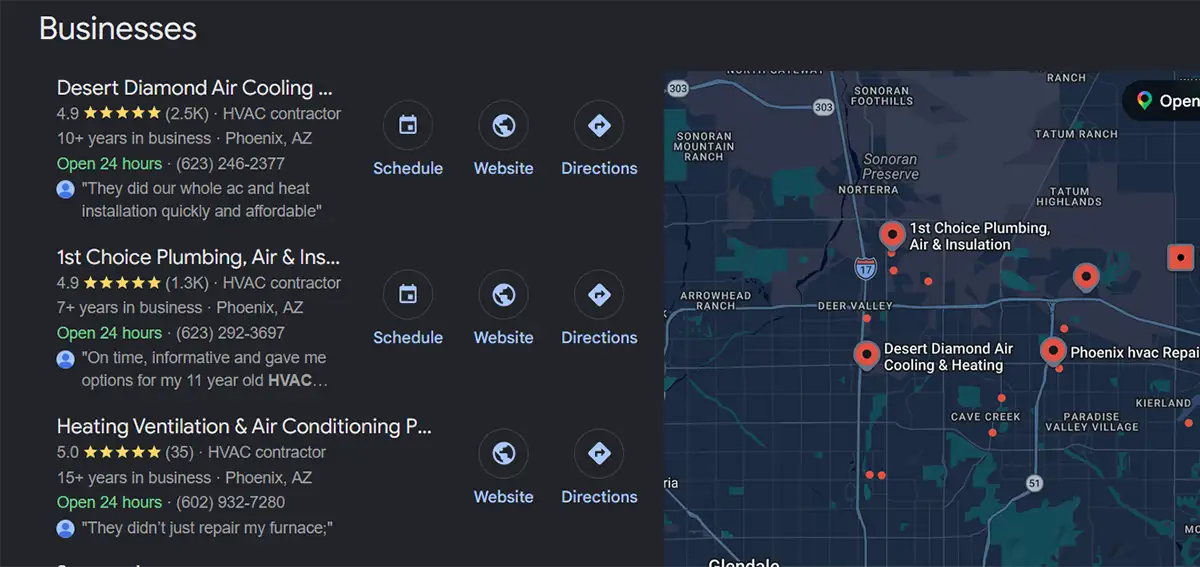
To know what you are up against, you need to look at things the way a customer does. When someone searches for what they need in Google, a map usually comes up showing the top three local businesses along with their Google reviews.
To see where you stand, do a quick check on your competition:
- Search for what you do: Search Google for your service plus your town (like “plumber Scottsdale” or “hair salon Phoenix”).
- Look at the top results: Check out the first three businesses that show up in the review rated local business results that appear beside the local map.
- Count their reviews: Find out how many reviews those top three businesses have.
The Golden Rule for Winning Customers
Just matching your rivals usually isn’t enough to beat them if they have been around for years. To really stand out and get people to choose you, aim for 10% to 20% more reviews than the top business in that map section.
For example, if the top three businesses have 150, 200, and 250 reviews, your ultimate goal should be around 275 to 300 reviews to safely take the crown.
New Reviews Beat Old Reviews Every Time
Google does not just count your total reviews. It cares a lot about how often you get new ones and how recent they are.
A business with 100 reviews, where five came in just this week, will often look better to Google and customers than a business with 150 reviews that hasn’t received a new one in two years. In fact, most customers rarely trust reviews that are older than three months.
How to Get More Google Reviews
Getting more reviews takes a simple system that you use every single day. Google strictly forbids paying people or offering free gifts and discounts for reviews. Instead, you just need to give great service and make it incredibly easy for people to leave feedback.
- Give Customers a Direct Link
Never make customers search Google to find your review page. You can grab a direct link right from your Google business account dashboard.
- Log into the Google account that manages your business page.
- Search your own business name on Google to bring up your dashboard.
- Look for the button that says “Get more reviews” (it features a small heart icon).
- Copy the short link provided.
- Share this exact link with your customers via text or email.
- Ask at the Perfect Moment
The secret to getting a “yes” is all about timing. You want to ask right when the customer is happiest with your work.
- Service Businesses: If you work in people’s homes, ask right when you finish the job before you leave the house.
- Stores and Online Shops: Send a note within a week after they get their item, so they have time to try it out.
- Office Professionals: Ask the moment you deliver a great result or finish a big project.
- Ask in Different Ways
Do not just send one email and hope for the best. Make asking a normal part of how you talk to customers:
- Just Ask in Person: Teach your team to say: “It was great working with you today! We’re a local business, and it helps us a ton if you leave an honest review on Google. Can I text you a quick link right now?”
- Send a Text Message: Almost everyone opens text messages immediately. Sending a friendly text with your direct link right after your service works better than anything else.
- Put it on Invoices: Add a simple button to your digital receipts that says: “How did we do? Click here to leave a review on Google.”
- Use QR Codes: If you have a physical shop or visit customers, print a QR code on your counter signs, business cards, or flyers so people can scan it with their phone camera.
- Don’t Be Afraid to Follow Up
People get busy and forget. A customer might fully intend to leave a nice review but gets distracted. Sending one polite reminder a few days later can double the number of reviews you get.
Keep it short: “Hi (Customer Name), just checking in to see if you were happy with our service. If you have a minute, your review on Google helps our business immensely!”

Always Reply
Getting the review is only half the job. You should reply to every single review, whether it is five stars or one star.
Replying shows Google that your business is active and open. Even better, it shows new customers that you actually care about feedback and want to make people happy.
Find your target number, make it easy for customers to click your link, and stay consistent. Before you know it, you might end up climbing the rankings and become the go-to business in your town.
 EMAIL US